Snapshot View
The Snapshot View is a persistent sidebar widget that gives you at-a-glance financial awareness while you work in your notes.
👁 Features
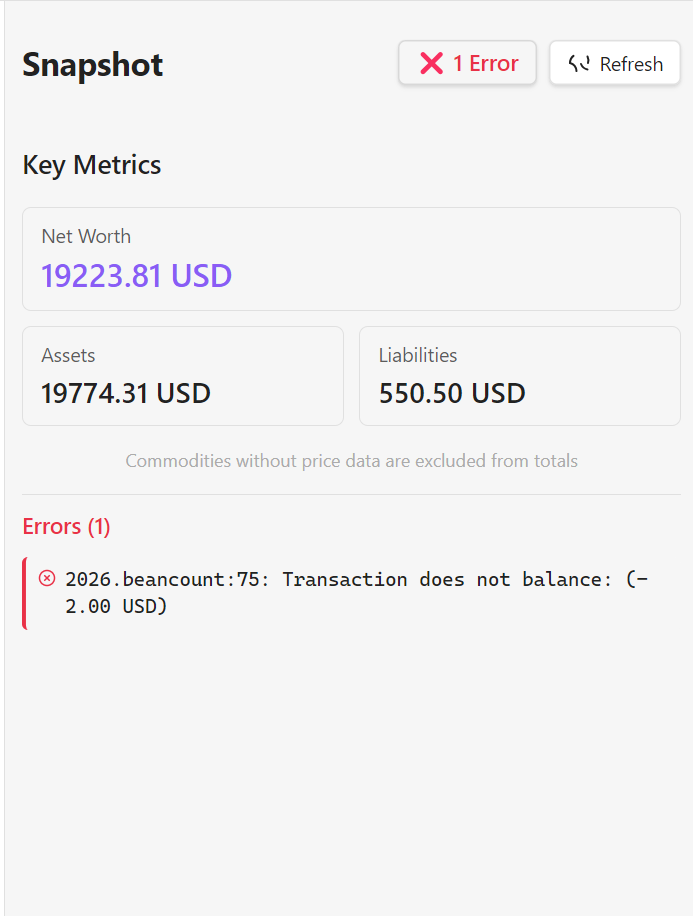
File Status Indicator
The status button at the top shows the health of your Beancount file:
- ✅ OK — File is valid, no errors detected.
- ❌ N Errors — Click to see a notification with the full error message list.
- Checking… — Validation is currently in progress.
Key Metrics
Displays three high-level financial indicators pulled directly from your ledger:
- Net Worth — Total position across all Assets and Liabilities accounts, converted to your Operating Currency.
- Assets — Total value of all Assets accounts in your Operating Currency.
- Liabilities — Total value of all Liabilities accounts. Positive numbers represent outstanding debt; negative numbers indicate a credit or overpayment.
All three values are rounded to 2 decimal places and shown in your configured Operating Currency.
Note: Commodities without price data are excluded from the totals. If you hold stocks or crypto without price directives, only the cash portion will be reflected.
Refresh Button
Reloads all KPI values, re-validates the Beancount file, and refreshes reconciliation status on demand.
✅ Reconciliation Tracking
Below the KPI section, a Reconciliation tab shows the health of all accounts configured with a reconciliation interval.
How It Works
For any account where you have set a reconcile: <days> metadata key on its open directive, the plugin tracks the date of the most recent balance assertion for that account. If the gap since the last balance assertion exceeds the configured interval — or if the account has never had a balance assertion — it is flagged as overdue.
What You See
- Summary row at the top: total overdue count and total up-to-date count.
- Per-account list below, each entry showing:
- ✅ Up to date — Last reconciled within the configured interval.
- ⚠️ Overdue — Last reconciliation was more than
<days>ago, with the overdue duration shown. - ⚠️ Never reconciled — No
balanceassertion has ever been recorded for this account.
Setting Up Reconciliation Intervals
You can configure the interval for any account in two ways:
- Via the Open Account modal (recommended): When opening a new account from the Accounts & Balances tab, fill in the optional "Reconciliation interval (days)" field. The plugin will add the
reconcilemetadata automatically. - Manually in your
.beancountfile: Add the metadata key directly to theopendirective:
2020-01-01 open Assets:Checking USD
  reconcile: 30
This tells the plugin to flag the account if it has not been reconciled within 30 days.
💡 Usage Tips
When to Use
- Daily note-taking — Keep it open in the sidebar while journaling to quickly reference balances.
- Quick checks — Glance at net worth without opening the full dashboard.
- Context switching — Maintain financial awareness while working on other tasks.
- Reconciliation reminders — Use the Reconciliation tab as a checklist to know which accounts need a balance assertion before closing the month.
Placement
Access the Snapshot View via:
- Command Palette:
Ctrl/Cmd + P→ "Open Beancount Snapshot". - Right Sidebar: Drag and position the view anywhere in Obsidian's layout.