Overview Tab
The Overview Tab is the landing page of the Unified Dashboard. It answers the question: "How am I doing financially right now?"
📊 Visual Analytics
Key Performance Indicators (KPIs)

At-a-glance metrics displayed at the top:
- Net Worth: Your total wealth (Assets + Liabilities) in your Operating Currency.
- Monthly Income: Total income accrued this calendar month.
- Monthly Expenses: Total expenses incurred this calendar month.
- Savings Rate: Your savings efficiency percentage:
Savings / Income × 100.
🎯 Financial Indicators
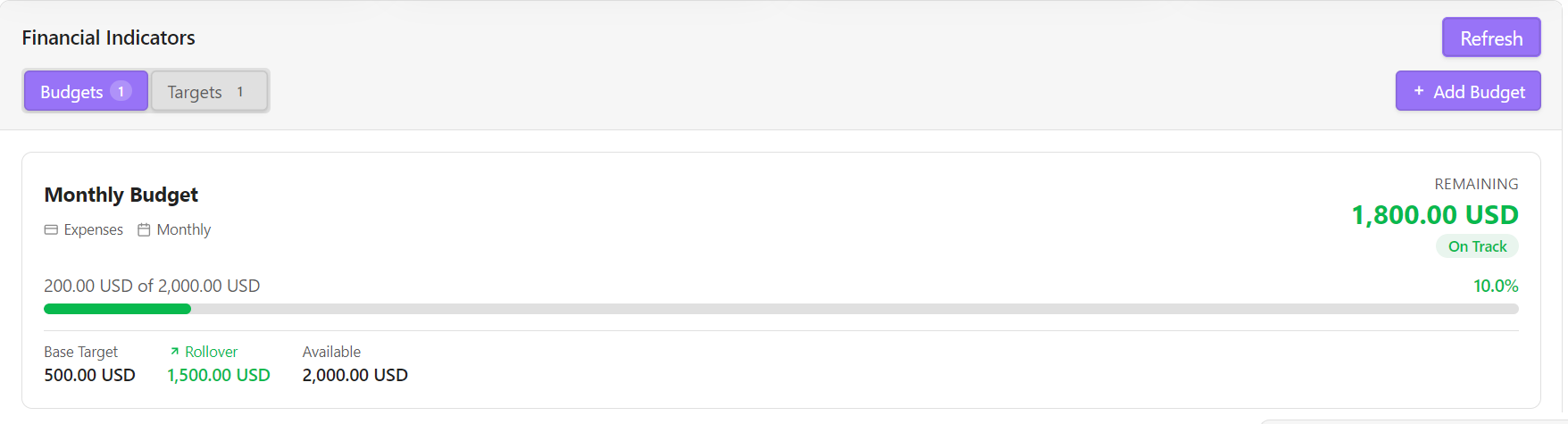
Below the KPI cards, the Financial Indicators section lets you define and track Budgets and Savings Targets backed by live BQL data.
Budgets
A Budget tracks spending against a periodic limit for an expense account. Each budget card shows:
- Name and expense account.
- Progress bar — colored green (on track), orange (≥75%), or red (over budget).
$spent of $availablelabel with percentage.- Status pill —
On Track,Warning, orOver Budget. - Stats row: Base Target · Rollover amount (if enabled) · Available (= Base + Rollover).
Rollover budgets accumulate unspent amounts across cycles. For example, if you budget $120/month and only spend $110, the extra $10 rolls forward and the next month's available budget becomes $130.
Adding a Budget
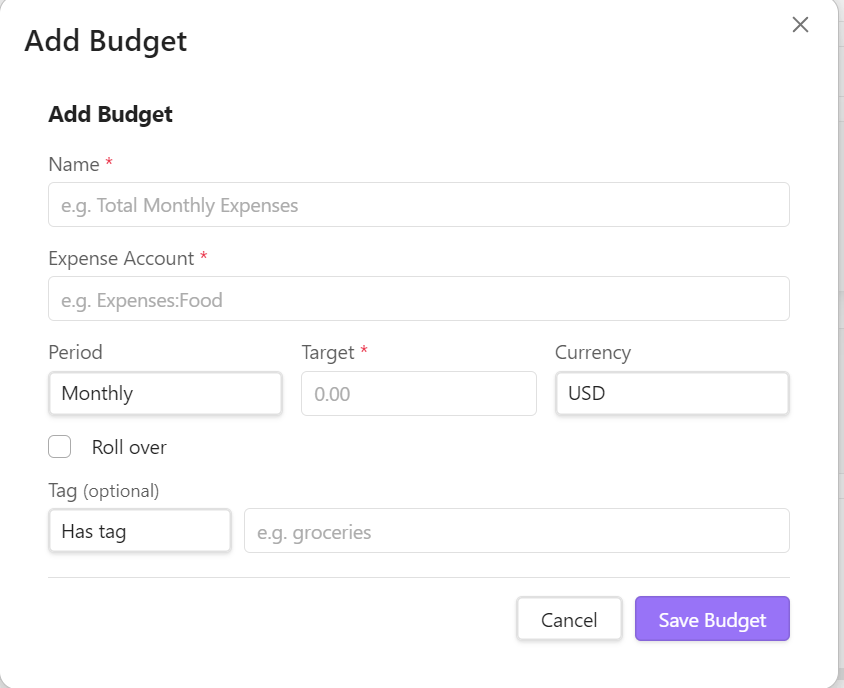
Click + Add Budget and fill in:
| Field | Description |
|---|---|
| Name | Display label (e.g. Groceries) |
| Expense Account | The Expenses:* account to track (autocomplete) |
| Period | Weekly, Monthly, Quarterly, or Yearly |
| Target Amount | Spending limit per cycle |
| Currency | Tracking currency (defaults to Operating Currency) |
| Enable Rollover | Roll unspent budget into next cycle |
| Start Date | When the budget begins (only shown when rollover is off) |
| Tag | Optional tag to filter transactions (e.g. dining or vacation) |
| Tag Mode | Match strategy: has (must contain tag) or not_has (must exclude tag) |
This writes an event "Indicator" "Budget" directive to events.beancount:
2026-01-01 event "Indicator" "Budget"
  name: "Groceries"
  accountQuery: "Expenses:Food:Groceries"
  cycle: "Monthly"
  target: 500.00
  currency: "USD"
  isRollover: 1
  tag: "groceries"
  tagMode: "has"
Targets
A Target tracks progress toward a savings or accumulation goal for an asset account. Each target card shows:
- Name and asset account.
- Progress bar colored by completion percentage.
- Stats row: Goal · Saved so far · Still needed.
Adding a Target
Click + Add Target and fill in the same fields as a budget (including optional Tag filters), but select an Assets:* account. This writes an event "Indicator" "Target" directive to events.beancount.